
Retrospective Prioritization
Your retro produced 15 action items. Your team can realistically tackle 3. ForceRank helps you pick the right ones.
The Retrospective Follow-Through Problem
Retrospectives generate great ideas but rarely lead to real improvement. The typical retro ends with a whiteboard full of sticky notes, a vague commitment to “do better,” and no clear priority order. Two weeks later, the team runs the same retro and identifies the same problems.
The core issue is not idea generation — it is prioritization. Teams try to address every improvement simultaneously and end up making meaningful progress on none of them. What they need is a way to pick the 2 or 3 improvements that will have the biggest impact and commit to those.
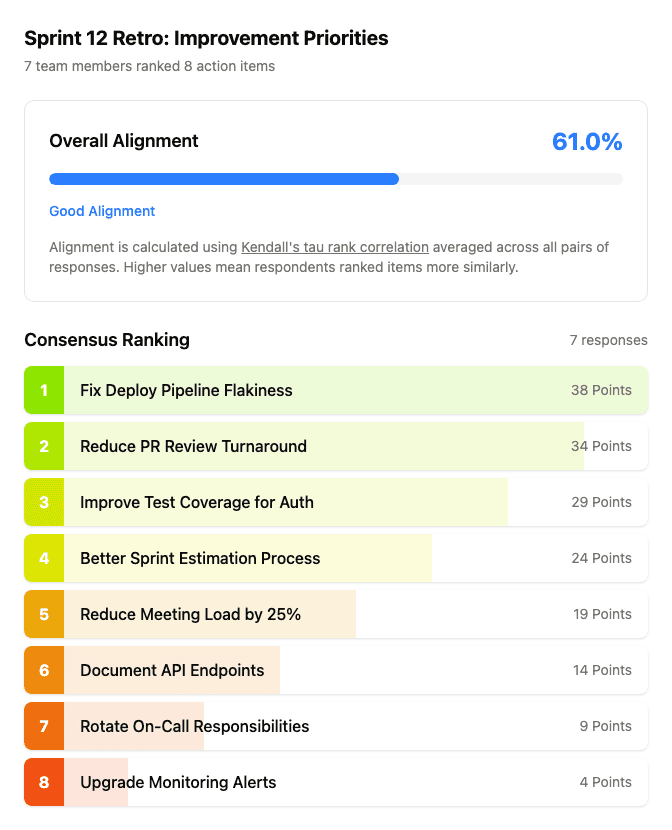
ForceRank turns retro action items into a ranked list. Every team member ranks the proposed improvements independently, and the algorithm reveals the group consensus. Instead of leaving the retro with 15 items nobody will act on, you leave with 3 prioritized improvements that the entire team has bought into.
How ForceRank Fixes Retrospectives
Collect Action Items
After the retro discussion, add all proposed improvements and action items to ForceRank. Include everything the team surfaced.
Everyone Ranks by Impact
Share the link with the team. Each person ranks the action items by expected impact — which improvements would make the biggest difference?
Commit to the Top 3
See the team consensus ranking. Commit to the top 2-3 improvements, assign owners, and create tickets. Review progress in the next retro.
Your Team Picked the Top 3
Instead of 15 sticky notes nobody acts on, your team leaves the retro with 3 clear priorities they all agreed on.
Try It: Rank Retro Improvements
Drag the items below to rank them in your order of priority.
Try it yourself — Rank Retro Improvements
Choices
Your Ranking
Retrospective Prioritization FAQ
- How do I use ForceRank in retros?
- After your standard retro discussion — what went well, what did not, what to change — collect all proposed action items and improvement ideas into a ForceRank question. Share the link with the team, and each person ranks the items by importance. The Schulze algorithm calculates the group consensus, so you walk away from the retro with a clear, team-agreed priority order for improvements. Commit to the top 2 or 3 and actually follow through.
- Should the whole team rank?
- Yes. The whole team should rank retro action items because everyone has a different perspective on what is slowing the team down. Engineers might prioritize tooling improvements. The PM might prioritize process changes. The designer might prioritize communication. ForceRank surfaces the genuine group priority — not just the loudest voice in the retro.
- Can I use this for remote retros?
- Absolutely. ForceRank is designed for async collaboration, which makes it perfect for remote and distributed teams. Run your retro discussion over video, collect action items, then share the ForceRank link for async ranking. Team members can rank on their own time, from any device, without needing accounts. Results are available instantly when everyone has submitted.
- How do I follow up on ranked items?
- The most important step in any retro is follow-through. After ranking, take the top 2 or 3 items and assign owners. Create tickets in your project management tool. Review progress in the next retro. ForceRank results are shareable via a link, so you can reference the original ranking in your follow-up. Some teams keep a running document that links to each sprint retro ranking to track improvement themes over time.
- How many action items should we rank?
- Between 5 and 10 is ideal. If your retro produces fewer than 5 action items, simple discussion might be enough. If you have more than 10, consider grouping related items into themes first, then ranking the themes. The goal is to have enough items that real tradeoffs exist, but not so many that ranking becomes tedious.
Prioritize Your Retro Action Items
Create your first retro ranking in under a minute. Free for everyone, no credit card required.